• Home
  • Upper School
    • Year 6 >
      • From iPad to PC and Beyond >
        • Section 1: What do you already know?
        • Section 2: What should I know?
        • 2 Why Cloud Computing?
        • 3 Images in the Cloud
        • 4 Apps in the Cloud
        • 5 Staying safe online
        • 6 Assessment
      • Endangered Animals >
        • 1. Research an endangered animal
        • 2. What are web banners?
        • 3. Google web designer
        • 4. Evaluation
      • Scratch Programming >
        • Programming constructs
      • Here Be Dragons >
        • Task 1: Dragons approaching
        • Task 2: Hunters and dragons
        • Task 3: The wizards arrive
        • Task 4: Magic and spells
      • Think Like a Computer Programmer >
        • Task 1: Go with the flow
        • Task 2: Being picky
        • Task 3: Going loopy
      • Internet safety >
        • Task 1: Getting started
        • Task 2: Research
        • Task 3: Scratch Begins
    • Year 7 >
      • ICT Admin Basics
      • Quiz Time >
        • Section 1: Breaking it Down
        • Section 2: Programming Introduction
        • Section 3: Quiz Project Work
      • How the web works >
        • LANs and WANs
        • How the Internet works
        • Components of the Internet
      • Creating a Webpage >
        • Task 1: Website features and Structure
        • Task 2: My first Webpage
        • Task 3: Comment Your Code
      • Think like a Computer Scientist >
        • Algorithms
        • Microsoft Small Basic
        • Bat and Ball
      • Aquarium Project >
        • Task 1: Project Planning
        • Task 2: Build your aquarium
        • Task 3: Present your project
      • Scratch to Python >
        • Task 1: Sequence and Selection
        • Task 2: Procedures and Functions
        • Task 3: Selection
    • Year 8 >
      • Bits and Bytes >
        • Section 1: Intro to Binary
        • Section 2: Bits, bytes, kilobytes
        • Section 3: Binary representation of letters and assessment
      • Spreadsheets
      • Robot Programming
      • User Interface and Operating Systems >
        • Task 1: What is an operating system
        • Task 2: What does the operating system do?
        • Task 3: User Interfaces
        • Task 4: CMD the command line
        • Task 5: Can you hack it
      • Music and Sound Editing >
        • Task 1: Review - File Sizes
        • Task 2: Digital Sound
        • Task 3: Samples & Sampling
        • Task 4: Compressing sound files
      • Programming Project
    • Year 9 >
      • Homes of the Future >
        • 9.1 Section 1
        • 9.1 Section 2
        • 9.1 Section 3
      • Encryption >
        • Task 1
        • Task 2 - Spreadsheet
        • Task 2 - Programming
        • Task 3
      • HTML5 Programming >
        • Task 1: 2D Graphics
        • Task 2: Animation
      • Computing Hardware and Logic Gates >
        • Task 1: Hardware
        • Task 2: Logic Gates
      • Game Design Project >
        • Setup Pygame
        • Graphics: Shapes
        • Graphics: Animation
        • Controls: Keyboard
        • Controls: Mouse
        • Challenge
        • Game Technique Demos
      • Stadium Project (ICT) >
        • Task 1: Build your stadium
        • Task 2: Count seats sold
        • Task 3: Sum Totals
  • GCSE
    • Programming Techniques >
      • While loop
      • Functions
    • Data Representation >
      • Binary
  • A-Level
    • DBMS
    • Processor Fundamentals >
      • Binary
      • CPU Architecture
      • The fetch-execute cycle
      • Assembly Language
    • Ethics and Ownership >
      • Ethics and the computing professional
    • Communication and Internet Technologies >
      • Client- and Server-Side Scripting
      • Protocols
    • Programming Techniques >
      • Binary Search v Linear Search
      • Bubble Sort
      • Insertion Sort
      • OOP - Object-Oriented Programming
    • Security >
      • Asymmetric keys and encryption methods
  • Programming
    • Getting started
    • Conditionals
  • Home
  • Upper School
    • Year 6 >
      • From iPad to PC and Beyond >
        • Section 1: What do you already know?
        • Section 2: What should I know?
        • 2 Why Cloud Computing?
        • 3 Images in the Cloud
        • 4 Apps in the Cloud
        • 5 Staying safe online
        • 6 Assessment
      • Endangered Animals >
        • 1. Research an endangered animal
        • 2. What are web banners?
        • 3. Google web designer
        • 4. Evaluation
      • Scratch Programming >
        • Programming constructs
      • Here Be Dragons >
        • Task 1: Dragons approaching
        • Task 2: Hunters and dragons
        • Task 3: The wizards arrive
        • Task 4: Magic and spells
      • Think Like a Computer Programmer >
        • Task 1: Go with the flow
        • Task 2: Being picky
        • Task 3: Going loopy
      • Internet safety >
        • Task 1: Getting started
        • Task 2: Research
        • Task 3: Scratch Begins
    • Year 7 >
      • ICT Admin Basics
      • Quiz Time >
        • Section 1: Breaking it Down
        • Section 2: Programming Introduction
        • Section 3: Quiz Project Work
      • How the web works >
        • LANs and WANs
        • How the Internet works
        • Components of the Internet
      • Creating a Webpage >
        • Task 1: Website features and Structure
        • Task 2: My first Webpage
        • Task 3: Comment Your Code
      • Think like a Computer Scientist >
        • Algorithms
        • Microsoft Small Basic
        • Bat and Ball
      • Aquarium Project >
        • Task 1: Project Planning
        • Task 2: Build your aquarium
        • Task 3: Present your project
      • Scratch to Python >
        • Task 1: Sequence and Selection
        • Task 2: Procedures and Functions
        • Task 3: Selection
    • Year 8 >
      • Bits and Bytes >
        • Section 1: Intro to Binary
        • Section 2: Bits, bytes, kilobytes
        • Section 3: Binary representation of letters and assessment
      • Spreadsheets
      • Robot Programming
      • User Interface and Operating Systems >
        • Task 1: What is an operating system
        • Task 2: What does the operating system do?
        • Task 3: User Interfaces
        • Task 4: CMD the command line
        • Task 5: Can you hack it
      • Music and Sound Editing >
        • Task 1: Review - File Sizes
        • Task 2: Digital Sound
        • Task 3: Samples & Sampling
        • Task 4: Compressing sound files
      • Programming Project
    • Year 9 >
      • Homes of the Future >
        • 9.1 Section 1
        • 9.1 Section 2
        • 9.1 Section 3
      • Encryption >
        • Task 1
        • Task 2 - Spreadsheet
        • Task 2 - Programming
        • Task 3
      • HTML5 Programming >
        • Task 1: 2D Graphics
        • Task 2: Animation
      • Computing Hardware and Logic Gates >
        • Task 1: Hardware
        • Task 2: Logic Gates
      • Game Design Project >
        • Setup Pygame
        • Graphics: Shapes
        • Graphics: Animation
        • Controls: Keyboard
        • Controls: Mouse
        • Challenge
        • Game Technique Demos
      • Stadium Project (ICT) >
        • Task 1: Build your stadium
        • Task 2: Count seats sold
        • Task 3: Sum Totals
  • GCSE
    • Programming Techniques >
      • While loop
      • Functions
    • Data Representation >
      • Binary
  • A-Level
    • DBMS
    • Processor Fundamentals >
      • Binary
      • CPU Architecture
      • The fetch-execute cycle
      • Assembly Language
    • Ethics and Ownership >
      • Ethics and the computing professional
    • Communication and Internet Technologies >
      • Client- and Server-Side Scripting
      • Protocols
    • Programming Techniques >
      • Binary Search v Linear Search
      • Bubble Sort
      • Insertion Sort
      • OOP - Object-Oriented Programming
    • Security >
      • Asymmetric keys and encryption methods
  • Programming
    • Getting started
    • Conditionals
Coding at school

Bubble sort

Part One: Understanding the basics

You may already have a good idea of how a bubble sort works.  A bubble sort compares In terms of thinking about their structure we can easily replicate a bubble sort using a flowchart.

Take a look at the folk dance video to gain a better idea of how a bubble sort works.

Bubble sorts use what we call a flag, the flag tells us that a swap has been made.  If we take the example on the folk dance video the flag is raised whenever a swap is made.  If the flag is lowered then we go back to beginning of the list and make another pass.  The flag is a boolean value (meaning it is true/false).


Part Two: Bubble sort flowchart

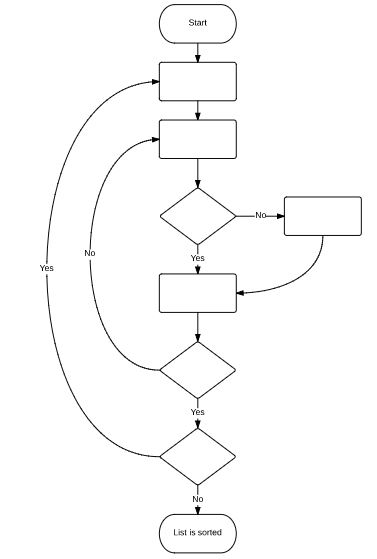
A flowchart can be used to represent a bubble sort.  It is a useful starting point when beginning to think about how we can code a bubble sort.

Task 1: Create a flowchart for a bubble sort.  If this is too hard use the template in the image to the right or check out this Lucid Chart template.  If you want to edit this you'll need to install the Lucid Chart Google App and make a copy.

Task 2a: Sort this list using a bubble sort, recording each step of the process

Fish, Dog, Elk, Ape, Bear, Cat

Task 2b: Look at the two lists below, which list will be sorted first and why?

List A: Bear, Cat, Dog, Elk, Fish, Ape

List B: Fish, Ape, Bear, Cat, Dog, Elk
Picture

Figure 1
Picture
Figure 2
Picture
Figure 3
Picture
Figure 4
Picture

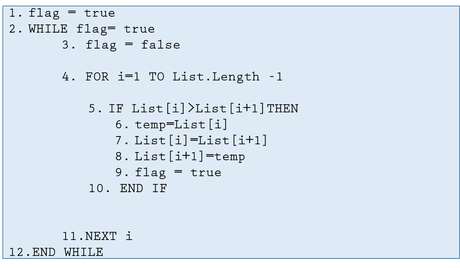
Part Three: Bubble sort Psuedo code

Let's take a look at the key things a bubble sort needs to be able to do:
  • move through a list one item at a time
  • compare two items
  • swap two items
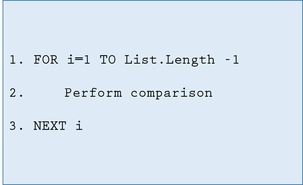
​Figure 1

Line 1: i represents the position of the item that is being checked, i=1 is the first item in the list.  The second part of this code means that we only go up to the last but one item in the list, this is because there is nothing to compare the last item in the list to.
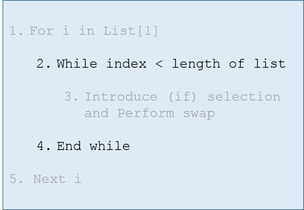
Figure 2

complete
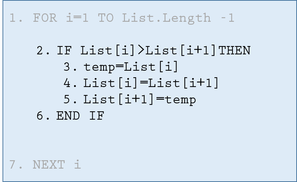
Figure 3

Line 3: Imagine you have two jars, 1 containing water and the other orange juice.  If you wanted to swap the contents of these jars you would need a third empty jar.  This is where we make use of the variable named temp.

Picture
Let's take two numbers, 5 and 3 and work through lines 2 through 5.
List [i] = 5 and List [i+1]  = 3

Line 2: 5 is greater than 3 so...
Line 3: temp = 5
Line 4: List [i] = 3
Line 5: List [i+1] = 5

So, by working through this code and using a temp variable we can see how the two numbers (items in a list) have now swapped position.
Figure 4

Here we start to add the final pieces of code, quite a lot happens in this step.

Line 1: We set our flag to true so that our loop will execute at least once

Line 2: The loop will execute as long as the flag is true

Line 3: The flag is now set to false before our for loop begins

Line 9: If a swap is made our flag is set to true so that the programme will loop once more.  Remember if no swap is made then the list is in the correct order.

Part Four: Bubble sort in Python

Task 4a: Using the Psuedo code from task three write a programme that uses a bubble sort to order a list of numbers.

If you are feeling stuck then use the video to the right to help you.

Task 4b: As an extension use this CSV file to read, sort, display and write an ordered list (using a bubble sort).

Part Five: Bubble sort in Scratch

Believe it or not Scratch is not just a tool used by primary school students!  By using Scratch you can apply your knowledge of how a bubble sort works to an interactive environment.

Task 5: Create a simple game that collates a score for each player.  Once 3 or more players have played the game use a bubble sort to order the top scores of the players.

Task 5b: Make use of cloud variables in order to allow for cloud stored top scores.  This will mean that top scores are saved as opposed to forgotten after  each session.
Powered by Create your own unique website with customizable templates.